HomeAbout OITResourcesDocumentationTraining and EventsSoftware ArchiveOIT Site Search

Resources > Student Resources > MSU NetID: The MSU NetID


Office of Information Technology - Montclair State University

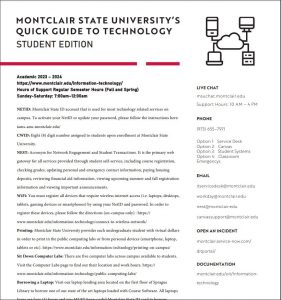
The MSU NetID


Sign up for a MSU NetID: http://netid.montclair.edu 

What is a MSU NetID?
What kinds of things can I use my MSU NetID for?
Do I need an MSU NetID if I already have a mail.montclair.edu e-mail account?
How do I get an MSU NetID if I don't already have one?
How do I change my MSU NetID password or reset a forgotten password?
But what if I don't know my HRS PIN?
What if I don't like the MSU NetID that was assigned to me? Can I choose a new one?
But my MSU NetID is spelled wrong! How do I get it fixed?
Isn't it a bad idea to have the same username and password for access to all systems?
So what makes a password "strong" as opposed to "weak"?
How do I activate my NetID? (PDF version)
How do I activate my NetID? (web animation version -- requires Flash)


What is an MSU NetID?

An MSU NetID is your unique electronic identity that gives you access to a growing number of online services at the University.

Your MSU NetID is based on your last name plus one or more characters from your first name.  Students NetIDs will also have a number at the end.  Here are a few examples:

Full name Status MSU NetID
Frank Smith student smithf4
Jane Cooper fac/staff cooperj
Jack Cooper fac/staff cooperja
Kathy Lincoln student lincolnk1

Each MSU NetID has an associated password, so when accessing University resources using your NetID you will also be required to enter your password.


What kinds of things can I use my MSU NetID for?

Almost all online resources at Montclair State require users to authenticate by entering a username and password.  We are working to unify all of these services using the MSU NetID and password.  One of the benefits of standardizing on the NetID for all online authentication is that you need to remember only one username and password to access any computing service on campus.

Currently, the following services use your MSU NetID and password:

The campus email system (mail.montclair.edu and the WebMail interface)
The MSU ISP dial-in service
The ELVIS electronic voting system
The Netriculate online DHCP registration form
The OIT Software Archive website
Blackboard online learning system
Parking Services "E-Park" system
Citrix thin-client computing environment
Network printing using your NetID

In the future, the following services will also use your MSU NetID and password:

WESS (Web for Students online registration)
Personal network file storage and web space
Administrative computing resources (HRS, SIS, FRS)


Do I need an MSU NetID if I already have a mail.montclair.edu e-mail account?

If you already have a mail.montclair.edu e-mail account, then you already have an MSU NetID. Your NetID is the part of your e-mail address to the left of "@mail.montclair.edu".

For example, a person with an e-mail address of "smithj@mail.montclair.edu" has an MSU NetID of "smithj".


How do I get an MSU NetID if I don't already have one?

The NetID management form at https://netid.montclair.edu can be used to activate and maintain your MSU NetID.

If you don't have an active MSU NetID, then the first time you use the management form it will walk you through the steps required for activation. During the NetID creation process, you will be asked if your personal information is correct. If it is not, DO NOT PROCEED WITH CREATING YOUR ACCOUNT!


Faculty and staff should Contact Human Resources to have their personal information corrected.  Students should contact the Registrar.  Once the information has been corrected, you may return to the NetID form and activate your MSU NetID.

**Please note that in order to activate your MSU NetID you will need to enter your Social Security number and HRS PIN. If you do not know your PIN you will need to contact Human Resources (faculty/staff) or the your identity and go to the Registrar (students) to obtain it.


How do I change my MSU NetID password or reset a forgotten password?

The MSU NetID management form at https://netid.montclair.edu provides an option for changing your password. You must enter your Social Security number and HRS or SIS PIN to enter the online form.


But what if I don't know my HRS or SIS PIN?

You will need to contact Human Resources to obtain your HRS PIN, or the Registrar to obtain your SIS PIN. You may be required to provide proof of your identity and go to the appropriate office in person to obtain your PIN.


What if I don't like the MSU NetID that was assigned to me? Can I choose a new one?

MSU NetIDs are unique University identifiers that are based on your full name as it appears in Human Resources or Registrar databases, so they cannot be arbitrarily chosen.

Individuals who legally change their name through marriage or other means can reapply for a new MSU NetID provided the name change has already been updated in the Human Resources and/or Registrar databases.


But my MSU NetID is spelled wrong! How do I get it fixed?

The MSU NetID system relies on the Human Resources and Student Information System as the definitive source of all user data. Contact Human Resources and have your name corrected in the HR database, or the Registrar to have it corrected in SIS.  Once your name has been corrected at the source, you may reapply for a new MSU NetID.


Isn't it a bad idea to have the same username and password for access to all systems?

Only if you use a "weak" password that can be guessed or cracked easily. From a practical standpoint having ten weak passwords is far worse than maintaining a single, strong password. You are much more inclined to choose a very strong password if it is the only password you need to remember. You are also less likely to write it down on a post-it note since its only one password, not a dozen different ones.

It is important to realize that your NetID password is the key to your
electronic identity at the University. It is crucial that you select a
strong password and do NOT share it with anyone else or write it down.


So what makes a password "strong" as opposed to "weak"?

Simply put, a strong password is more difficult to guess or crack than a weak one. Strong passwords are usually 8 characters or more, and contain a mixture of letters, digits, and special characters (like #$*@)

The golden rule is that a strong password should be easy for the owner to remember, but very difficult for anyone else to guess or discover.

Some examples:

Weak passwords
hello (common dictionary word, easily guessed)
welcome (common dictionary word, easily guessed)
emoclew ("welcome" spelled backwards.  Even the most basic password cracking program will try all dictionary words both forwards and backwards)
password (common dictionary word, easily guessed)
C0mPuT3r (looks strong, but password cracking programs know all the common tricks like mixed case, and substituting
zero for "O", 3 for "E", "$" for "S", etc.)

Rule of thumb: NEVER, EVER use a word from the dictionary as your password, even if you reverse it and substitute a 3 for an "E".  Dictionary-based password cracking tools compare passwords against a large database of words and perform hundreds of combinations on each one to try to crack your password.  The success rate of these cracking tools is surprisingly high.

Strong passwords
IwaDaSN (first letters of "It was a Dark and Stormy Night" easy to remember, very hard to crack)
t1mv$pw (first letters of "this is my very strong pass word" with 1 instead of i and $ instead of "s". In this case the added numeric and special characters make for a stronger password since it is not a dictionary word)
katz&dawgz (again, easy to remember but very hard to crack due to the use of two non-dictionary words joined with a
special character)

top

 
Montclair State University

Montclair State University, Montclair, NJ 07043
helpdesk@mail.montclair.edu - Help Desk: 973-655-7971

Office of Information Technology